
Software built for pest control operators.
In this trade the invoice is not the only document that matters. What you applied, where, how much and under whose license is a record someone can ask to see.
The application record is included on every plan.
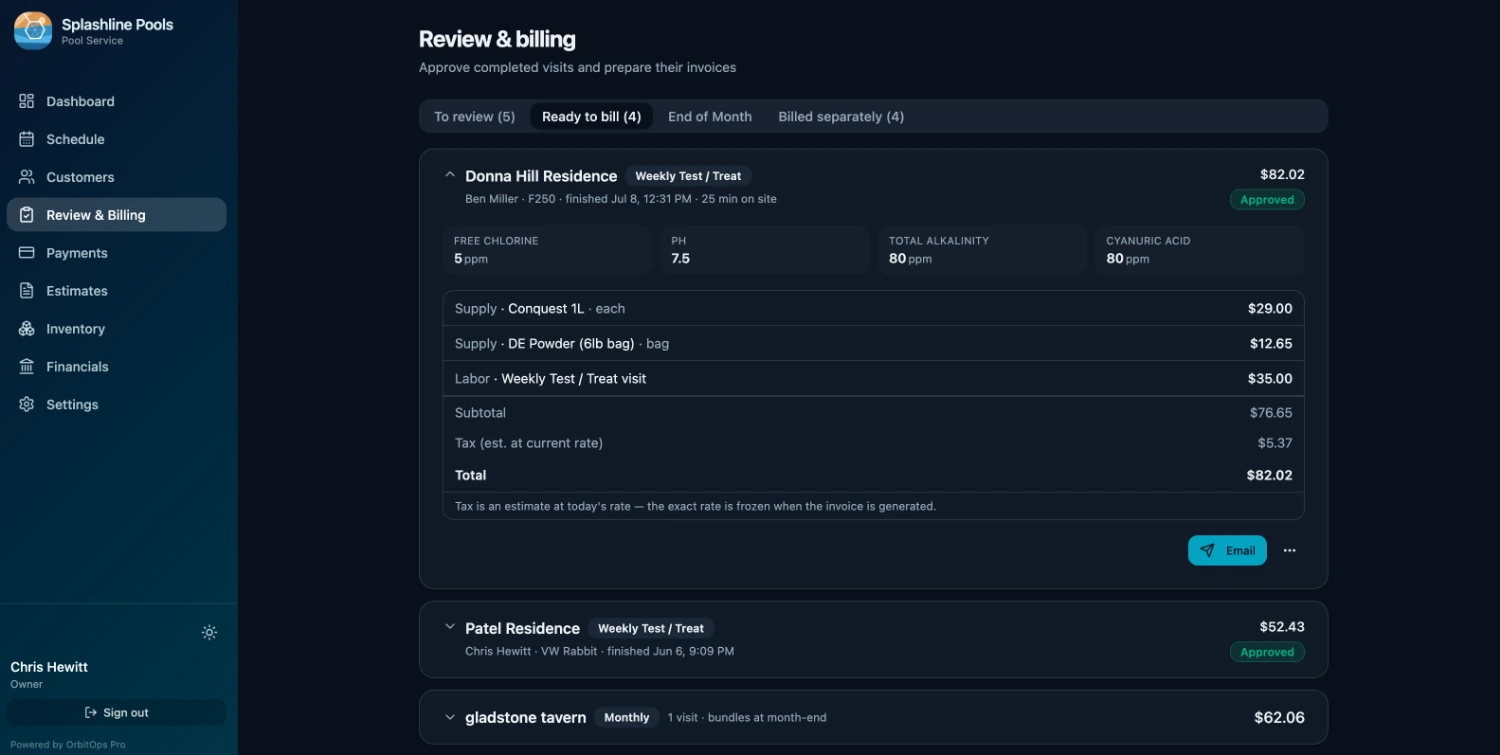
Pest control carries an obligation most field-service trades don't. Every application is a regulated act, and the record of it has to survive long enough for someone official to read it — usually years after the tech who made it moved on.
OrbitOps Pro treats that record as a first-class part of the visit rather than a form bolted onto the end of it. The same action that logs the product for compliance is the one that puts it on the invoice.
The record an inspector can ask for
A shoebox of carbon copies is a record right up until the moment you need to find one specific treatment from three summers ago.
Captured on the visit
What was applied, how much of it, where it went, which pest it targeted and under whose license — recorded by the tech at the property as part of doing the work.
Printed on the invoice
The application detail comes out on the customer's bill, so the homeowner has the same document you do and nobody has to request a copy later.
Included on every plan
Application tracking is on all three plans, deliberately. A compliance document is not a premium capability, and a billing decision should never be able to un-render one.
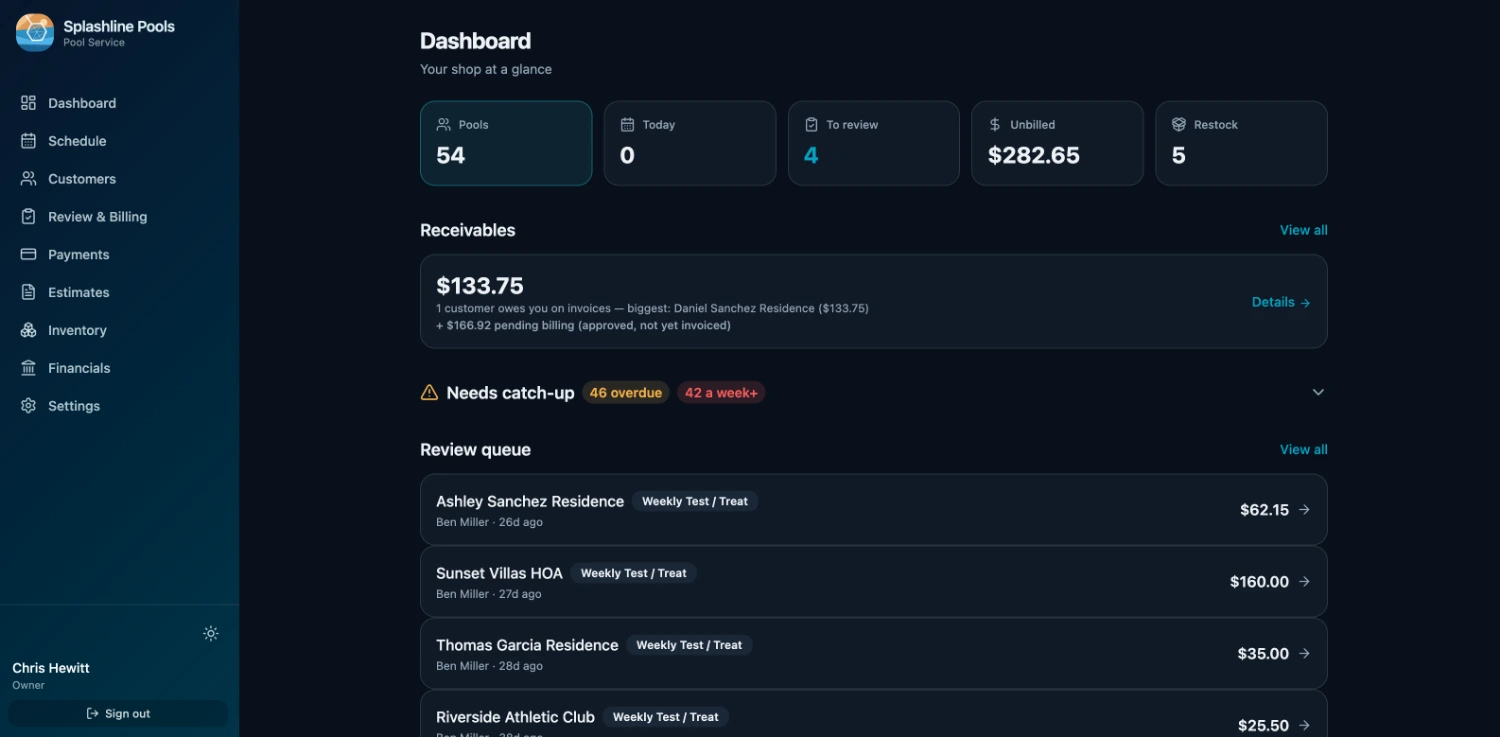
Requirements vary by state, so check the detail you capture against your own regulator. What OrbitOps Pro guarantees is that the record exists, sits on the property, and can be produced.
Every property on its own cadence
A pest book is rarely one rhythm. Some accounts are monthly, some quarterly, some are commercial and want a Tuesday before opening. The schedule has to absorb all of that without a person rebuilding it.
Set it per property
Monthly, bi-monthly, quarterly or your own interval, defined on the account. One click builds the week for every property due, across every service on that account and including anything carried over — so the recurring book stops needing manual rescheduling.
No drift on a quarterly cadence
Second Tuesday of the month, every three months, means exactly that — this year and next. The cadence math is month-native, so a quarterly or bi-monthly account lands on the same ordinal weekday all year instead of sliding a few days with every cycle.
The day that adds the least driving
For every account still waiting to be scheduled, OrbitOps Pro works out which day absorbs them for the least extra driving and names it before you commit. It is worked out on your own book, so there is no per-lookup cost — and it is choosing the day, not reordering the stops inside it.
The week on paper, before the signal drops
One press saves the week as a PDF: every scheduled stop, who it is assigned to, and the contact details for the customers on it. If a property sits out of signal, the day still runs off the copy you already saved.
Confirm before the truck rolls
Interior treatments need someone home. Appointment confirmation and appointment mode are both on for pest control, on every plan, so a window is confirmed before it is driven to.
Clustered, then sequenced
Cluster the day's stops by location on any plan. On Executive and Premier, route optimization orders the day and draws it on a map.
Callbacks that don't get lost
A re-service between scheduled treatments is a visit like any other — scheduled, checklisted and recorded against the property, whether or not you charge for it.
The one-off calls get a board of their own
The quarterly round runs itself. The wasp nest over a front door, the rodent in the attic and the termite inspection for a closing next Friday do not — and on every plan they go on a dispatch board.
New call suggests who and when
Day, week and month for each tech. New call asks what kind of call it is and whose it is, then offers the techs who do that kind of work — the licensed termite inspector, not just whoever is free — with their next open time and the drive from where they will be.
Running behind, and the emergency
A tech running behind shows on the board while the window can still be kept. An emergency can bump a stop, and the moved customer lands in Unassigned, flagged to call and rebook.
Team and the To do list
The Team tab holds time off, holidays and the on-call rotation. To do lists the recurring treatments that have come due and still need a day, so the round and the calls share one calendar.
Text-to-book
On Executive, with your own toll-free number verified with the carriers: a customer texts it, the message lands in the board’s tray, and a person in your office books the call. The customer gets one acknowledgement text so they know it arrived. Nothing else answers them.
The day arrives on the phone, already in order
The office builds the week. The tech opens one screen and works down it — and everything recorded on the way is what the invoice gets built from. The tech’s half runs in the OrbitOps Field app (App Store · Google Play); the office’s half runs in the browser.
Open it and work down the list
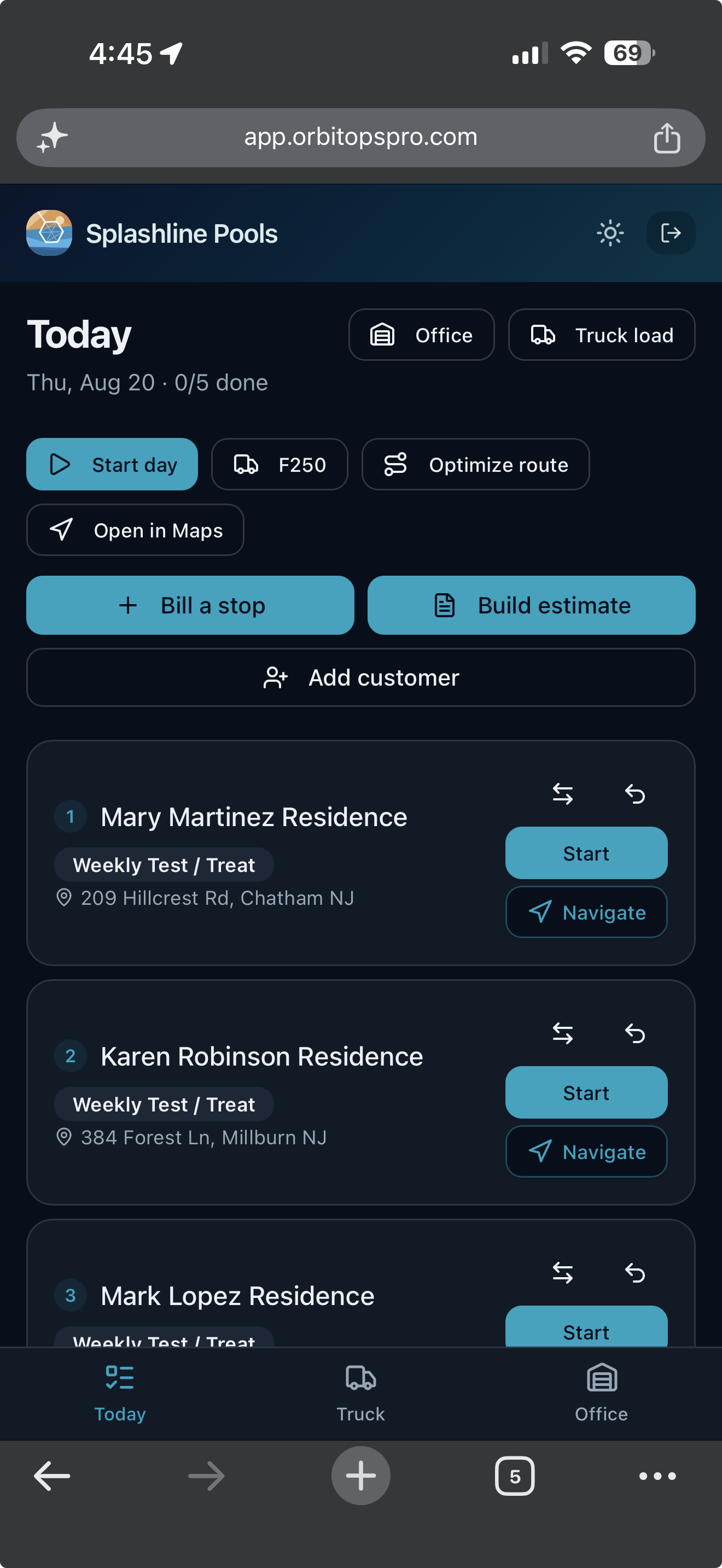
Today opens on the stops in order, each with the customer, the visit type and the address, and a count of how many are done. One tap starts a stop, one opens it in Maps. Nobody is calling the office to ask what is next.
What they record is what you bill
Materials, readings and notes are captured at the stop while the tech is standing in it. The visit record is the billing record, so the invoice is built from what happened rather than reconstructed on Friday.
Billing and quoting from the driveway
A tech you trust can bill a stop as they finish it, and build an estimate while they are standing in front of the work. What they bill in the field is past the month-end sweep’s reach, so the same visit cannot also land on that customer’s monthly bill. The billing grant is per tech and yours to give. Quoting from the field is on every plan — the foreman standing in front of the work is the one who knows what it is. Writing the ordered scope onto that quote, photographing what is being quoted, and starting from a quote you have already written come in on Executive.
One action, two obligations: logged and billed
Most operators log the application because they have to, and bill the product from memory because nobody made that easy. The second half is where the margin quietly goes.
The tech logs it once
The product recorded for the compliance entry is the same product that lands on the invoice. There is no second form and no re-typing at the end of the week.
Stock draws down with cost attached
On Executive and Premier, the same entry pulls that quantity out of truck or shelf stock and carries its cost, so you can see what you are holding and what each treatment actually costs to deliver.
Reorder before you're dry
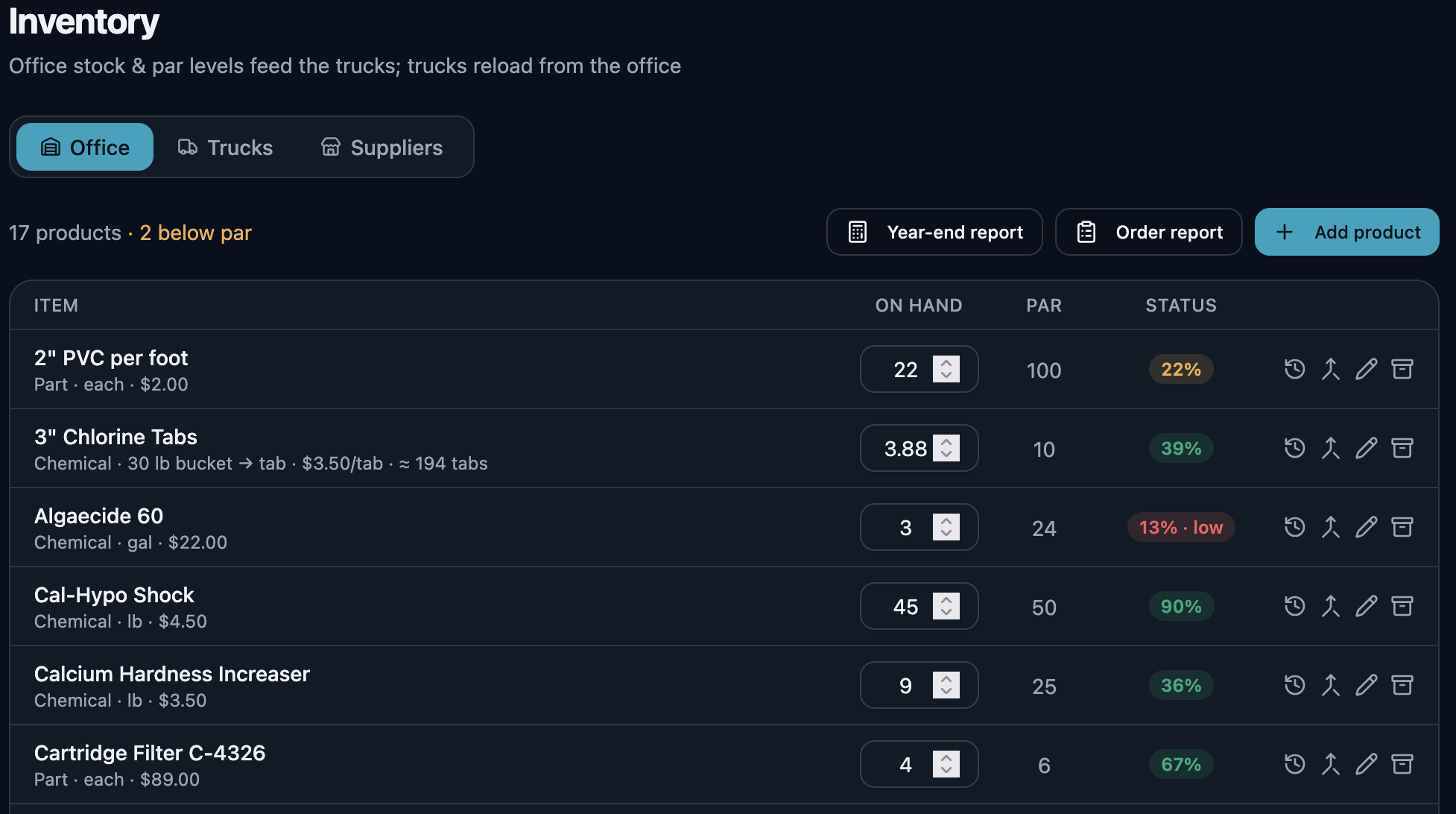
Par levels flag what's short and a purchase order to your supplier brings it back in. Booking that delivery in puts the product on the shelf and marks off what arrived, so a pallet that comes in two drops is two deliveries against one order — the restock loop closes in the same system that raised the flag.
Buy by the case, sell by the piece
On Executive and Premier, one product entry can be bought by the case and sold by the piece. Order a case of bait stations, the tech logs four, and the stock count and the price each move in their own unit — one product record, no mental arithmetic.
The delivery back in, in one press
The last arrow is the one most systems leave to you. When the order turns up, book it in against the purchase order that raised it: the stock lands on the shelf and the order marks off what arrived, in the same press. Nothing is counted twice — press it again on a bad signal and the second press moves nothing.
- Half now, the rest next week. A short delivery is recorded for what actually came, and the remainder stays open on the order. The next van is a second delivery against the same PO, not a correction to the first.
- You cannot receive more than you ordered. A line that would take the delivered count past what the order asked for is refused, not quietly absorbed.
- A wrong delivery is corrected, never rewritten. Undo one and it takes back exactly what that delivery put on the shelf — read from the record the delivery itself wrote, not recalculated from what the order says today. Nothing is deleted: the reversal is appended beside the delivery, so a delivery that arrived and was taken back stays two facts rather than becoming silence. Miscounted it? The original is kept and reversed, and a new one records what really arrived, linked back to the one it replaces — the same way an invoice is voided and reissued instead of edited.
- All of it, or none of it. If the fourth line on a delivery names a product you have since removed, the first three do not land either. There is no half-received order to unpick.
- Photograph the slip, read the statement. On Executive, the AI assist reads a photographed packing slip against the purchase order it belongs to, and reads a supplier statement so it can be reconciled line by line against the deliveries it bills. Both come back as proposed matches. The office confirms each one, and nothing is settled until somebody says which.
Inventory tracking and purchase orders come in on Executive. On Premier, the money-recovery reports name the accounts that cost more to serve than they bill.
Agreements that know their own terms
Most of a pest book is sold as a plan rather than a job. The question that gets awkward is what exactly a given customer has left on theirs.
Define what you sell
Set up the agreement levels your business offers and what each one includes per term. Available on Premier.
Assigned with a term
A customer gets a level and a mandatory term, so the agreement has a defined start, end and content rather than an understanding.
Included, used, remaining
See what the plan covers, what has been drawn against it and what is still owed — without counting back through a year of visits.
Billed how you sell it
Per treatment as each closes, or a month rolled into one invoice. Both go out with a pay link the customer settles by card, on every plan. Each customer has their own default, set on their record, so the choice is made once for that customer instead of job by job.
The customers still waiting on something you meant to do
A tech writes up a rotted sill or a nest in a crawlspace on a Tuesday and nobody quotes it. A customer approves an exclusion job and it never reaches a route. These are not leads to chase — they are your own customers, waiting on work you fully intended to do.
- A repair your tech flaggedThe tech closed the treatment, wrote down the conducive condition or the exclusion work it needs, and no quote has gone to that customer since.
- A visit that would bill nothingA treatment closed, still waiting on your review, and carrying no charge at all — caught before it becomes a month-end invoice that says the same.
- Approved, never scheduledThey said yes to the quote. It never became a job on anybody’s day.
- A quote that went quietSent, and a week has gone by with no answer — long enough that a follow-up still reads as attentive rather than late.
- An agreement coming to its endThe term runs out inside the next two months and it does not renew itself. Agreements themselves are part of Premier.
- A customer nobody has been toStill on your books, still marked active, and ninety days since anyone closed a visit for them.
Every one of these is read off records you already have — visits, quotes, line items, agreements. One line each, and one action each: start the quote, add the charge, book the job, send it again. Anything genuinely fine gets dismissed, and dismissing it is neither a snooze nor forever — the moment something new happens for that customer, the row comes back on its own. The seventh list, warranties about to lapse, reads the warranty date on a part installed against a unit record — so it fills up for the trades that keep one.
And the local post you never get around to writing
The same section turns a job you have already finished into a short local update: the service, the kind of work, the town, the month and its season. No customer’s name, no street address and no price can appear in one, because the facts a post is written from carry no such field. The town is in; the street is not. Here, the seasonal round and the seasonal tip are two of the six occasions it writes from.
Ready to copy to Google Business Profile, Facebook, Instagram or Patch. Each one’s length is checked before you copy — past Google’s 1,500-character limit is a problem to fix, past the point Facebook folds the rest behind “See more” is only worth knowing — and nothing is ever cut short for you. Hashtags appear only where the channel takes them.
Quarterly treatments are running through Goose Creek this month. Fall is when everything that has spent the summer outside starts looking for a way in, and the perimeter work now is what you are not dealing with in December.
We do not post on your behalf and OrbitOps Pro holds no account of yours on any of them. You copy the words out and post them yourself.
What pest operators ask us
Does it keep the application record my state requires?
Application tracking records every product applied on a visit — what it was, how much, where it went, which pest it targeted and under whose license — and prints it on the invoice. It is included on every plan, because a compliance record should not sit behind an upgrade. You should still check it against your own state's specific requirements.
Can I run properties on different cadences?
Yes. Set a cadence per property — monthly, bi-monthly, quarterly or your own — and OrbitOps Pro generates the visits. Each day arrives as a built list. You can cluster the day by location on any plan; on Executive and Premier, route optimization sequences and maps it.
Will the product my techs apply get billed?
On Executive and Premier. The product logged for the application record also becomes an invoice line and draws that quantity down from truck or shelf stock with its cost attached — so the compliance entry and the billing entry are the same action, not two.
Can I sell service agreements?
On Premier. You define the agreement levels you sell and what each includes per term, assign one to a customer with a term, and read off what is included, what has been used and what remains — so a mid-term callback question has an answer.
Can I bill monthly instead of per treatment?
Either, and you can mix them across your book. Bill each treatment as it closes, or roll a month of visits into one invoice. Each customer has their own default, set on their record, so the choice is made once for that customer instead of job by job. Both go out with a pay link the customer settles by card, and both are included in every plan.
Can I confirm appointments before the tech drives out?
Yes. Appointment confirmation and appointment mode are both on for pest control, on every plan, so interior work that needs someone home can be confirmed before the truck is committed to the window. On Executive the confirmation goes by text from your own number to customers who have agreed to texts, and they reply to confirm; without texting, the board shows which appointments still need a confirmation call.
Your customers didn't sign up for our software — you did. Their names, addresses and phone numbers stay in your account. Your books get a month of totals rather than your client list, and our own support console can't display who they are.
What leaves your account →Run your pest control business, not your software.
Create your account and get set up in your trade. Scheduling, invoicing and card payments are included in every plan.
Questions first? Talk to us.
Email support@orbitopspro.com to chat with us.