
Software built for pressure washing operators.
One-off residential work and commercial routes on a cadence, on one board. The week builds itself, the bid stays attached to the job that came out of it, and the chemical that went through the pump ends up on the invoice.
Quoted jobs, recurring commercial routes and chemical billing in one place.
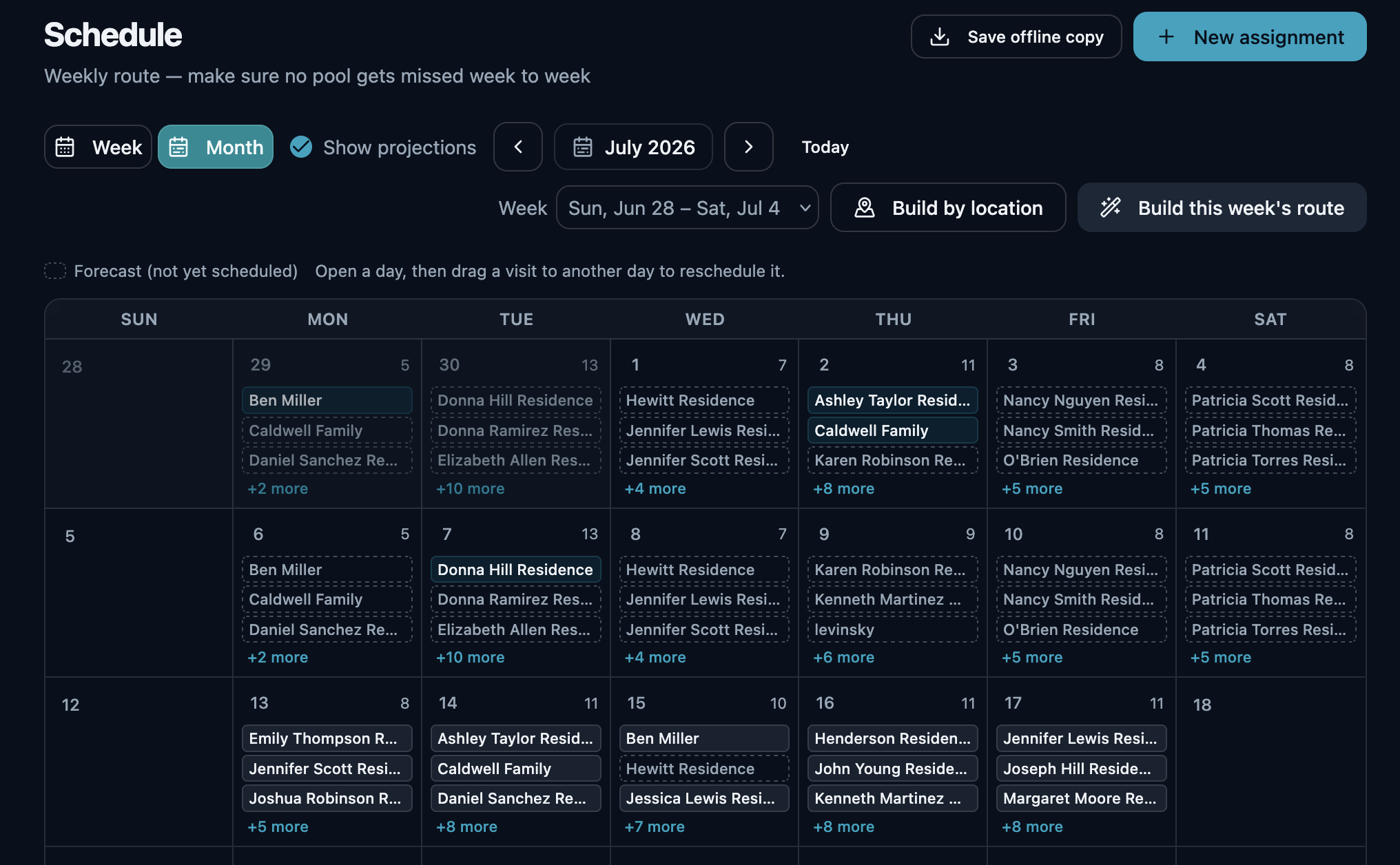
Pressure washing is two books on one board. There is the residential side — house washes, driveways, decks, roofs — quoted one at a time and run when the weather allows. And there is the commercial side, the one that pays every month: storefronts, lots, dumpster pads and drive-thrus on a set cadence, invoiced together.
Both burn product. A soft-wash mix on a north elevation, a degreaser on a stained pad, a rust remover on a concrete apron — it goes through the pump on a job quoted weeks ago, and only turns into money if somebody writes it down. OrbitOps Pro builds the week from your cadences, keeps the quote attached to the job it became, and puts what the crew mixed on the bill.
Two books, one board
A house wash booked for Thursday and a strip mall due on its monthly cadence are the same thing to a schedule: a stop that has to happen, at a place, with a crew and a rig.
One click builds the week
Set each commercial account's cadence once — weekly, monthly, quarterly or your own interval. One click then builds the week from everyone due, commercial and residential together, including jobs carried over from a week the weather took.
The week on paper, before the signal drops
One press saves the week as a PDF: every scheduled job, who it is assigned to, and the contact details for the customers on it. If a property sits out of signal, the day still runs off the copy you already saved.
Build the day by location
Cluster a day's stops geographically so a crew clears one side of town before moving on, instead of towing the rig back across it after lunch. Included on every plan.
Sequenced and mapped
On Executive and Premier, route optimization orders the day's stops by drive time and draws the route on a map. A rig and a full tank is not a vehicle you want doubling back.
The lot that has to be done before opening
Every recurring stop works one of two ways, set per customer. Anchor it to a day when the surface has to be clean for something — the drive-thru before the Friday rush, the lot before a weekend sale — and the route builder never moves it. Or leave it loose for clustering to place wherever it cuts the most driving — and an anchored stop is still folded into the tightest route of its day. Most weeks are a mix.
Rain moves the work, not the record
A job you could not run stays flagged against that customer until it is washed or dismissed. Three days of rain pushes a week of stops; it does not drop them out of the book, or out of the month's billing.
The day that adds the least driving
For a new account waiting to be scheduled, OrbitOps Pro names the day that absorbs it for the least extra driving, before you commit. Worked out on your own book, so there is no per-lookup cost — and it chooses the day, not the order of stops inside it.
The day arrives on the phone, already in order
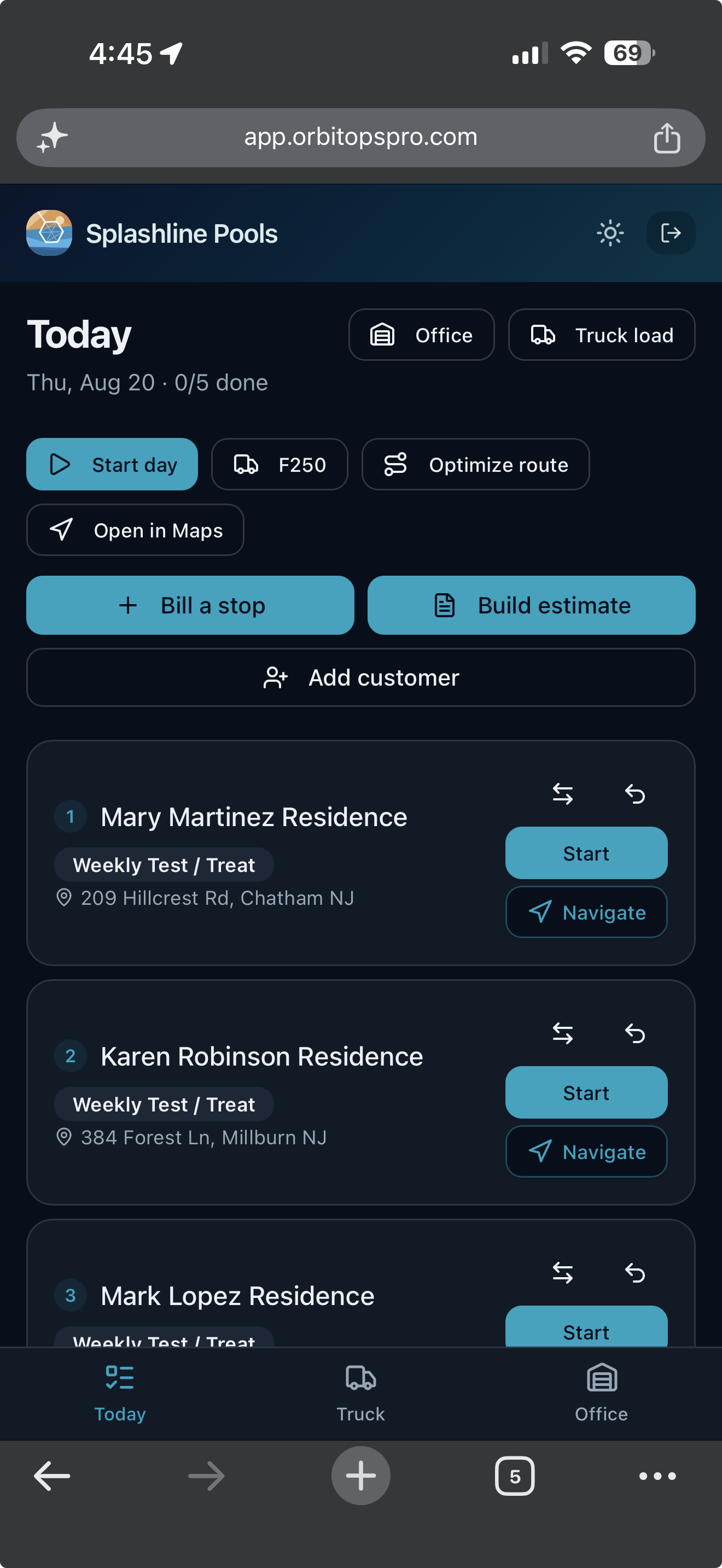
The office builds the week. The tech opens one screen and works down it — and everything recorded on the way is what the invoice gets built from. The tech’s half runs in the OrbitOps Field app (App Store · Google Play); the office’s half runs in the browser.
Open it and work down the list
Today opens on the stops in order, each with the customer, the visit type and the address, and a count of how many are done. One tap starts a stop, one opens it in Maps. Nobody is calling the office to ask what is next.
What they record is what you bill
Materials, readings and notes are captured at the stop while the tech is standing in it. The visit record is the billing record, so the invoice is built from what happened rather than reconstructed on Friday.
Billing and quoting from the driveway
A tech you trust can bill a stop as they finish it, and build an estimate while they are standing in front of the work. What they bill in the field is past the month-end sweep’s reach, so the same visit cannot also land on that customer’s monthly bill. The billing grant is per tech and yours to give. Quoting from the field is on every plan — the foreman standing in front of the work is the one who knows what it is. Writing the ordered scope onto that quote, photographing what is being quoted, and starting from a quote you have already written come in on Executive.
“On my way,” with a face on it
On Executive, the tech taps Depart and the customer gets an “On my way” text with a link to an arrival page: your logo, the tech’s first name and headshot, and where the visit sits in the day — stop 2 of 4, or the appointment time. No map and no live tracking; just who is coming.
The bid and the job are rarely the same size
A house wash priced off a photo, a lot measured on a map, a post-construction clean bid before the site is clear. The number goes out before anybody has stood on the property, and what the crew finds there is the difference between a good job and a break-even one.
Quoted against the property
Quoting the wash against the property is on every plan. On Executive, the quote carries photographs of what you are pricing — the stained drive, the mildewed siding — and an ordered scope that prints on the customer’s copy and is handed to the crew as the checklist for the job. The next quote for a similar property starts as a copy of that one rather than from a blank page.
Approved becomes scheduled
Once the customer approves, the estimate becomes a scheduled job carrying its scope, and the crew opens the day with what was quoted. When it closes, the job is the invoice — and a one-off can move onto a recurring cadence from there.
What the job actually took
On every plan, the approved estimate runs the job and whatever the crew adds on site is captured against it as a marked overage. Oxidation that needed a second pass, rust that took its own product, gutters brightened while the ladder was up — the bid-to-job difference shows on the bill as an addition instead of being absorbed.
The chemical you don’t bill is margin washed away.
Detergent, degreaser, sodium hypochlorite, surfactant — every wash mixes real product. Log it on the job and it’s on the invoice. Bury it in a flat price and the chemical you burned is cost you never recovered.
Techs log what they use, on the visit
Detergents, degreasers and soft-wash chemicals get recorded on the tech's checklist while they're on site — not reconstructed from memory at the end of the week.
Used becomes billed, automatically
Whatever went onto the job flows straight onto the invoice as a line item. The checklist is the billing record. One action, both records: the visit log and the invoice line.
See what’s on the rig, and what it's worth
On Executive and Premier, every logged item draws down truck and shelf stock in real time, with cost attached — so you know what you're holding, what it's worth, and when to reorder.
Buy by the drum, mix by the gallon
On Executive and Premier, one product entry can be bought by the drum and used by the gallon. Order a fifty-five gallon drum, the crew logs two gallons, and stock and price each move in their own unit — one product record, no mental arithmetic.
Reorder what's short, in whole packs
On Executive and Premier, the reorder report shows what has fallen below par, rounds each shortfall up to whole orderable packs and emails the purchase order to your supplier. The sent order is kept as a fixed snapshot, with your own costs off the supplier's copy.
The delivery back in, in one press
The last arrow is the one most systems leave to you. When the order turns up, book it in against the purchase order that raised it: the stock lands on the shelf and the order marks off what arrived, in the same press. Nothing is counted twice — press it again on a bad signal and the second press moves nothing.
- Half now, the rest next week. A short delivery is recorded for what actually came, and the remainder stays open on the order. The next van is a second delivery against the same PO, not a correction to the first.
- You cannot receive more than you ordered. A line that would take the delivered count past what the order asked for is refused, not quietly absorbed.
- A wrong delivery is corrected, never rewritten. Undo one and it takes back exactly what that delivery put on the shelf — read from the record the delivery itself wrote, not recalculated from what the order says today. Nothing is deleted: the reversal is appended beside the delivery, so a delivery that arrived and was taken back stays two facts rather than becoming silence. Miscounted it? The original is kept and reversed, and a new one records what really arrived, linked back to the one it replaces — the same way an invoice is voided and reissued instead of edited.
- All of it, or none of it. If the fourth line on a delivery names a product you have since removed, the first three do not land either. There is no half-received order to unpick.
Most tools bill the job and swallow the chemical. OrbitOps Pro captures both — because what comes off the truck goes on the bill.
See what each plan includesWho ran it, and what it cost to run
Most wash days are two people and one rig: someone on the wand, someone on the surface cleaner. What the day cost you is labor plus chemical, and neither is on the invoice.
Assign the day to a crew
Put a day's jobs against a crew rather than an individual and see the schedule split by who is running which route. Crew assignments are on every plan. The crew is stamped on the job when it starts and the job carries its own duration, so the record says who ran a wash and how long the rig was on the property — what you charge for that is your call when you bill.
Helpers never open the app
A helper can ride any single-day job, not only a crew’s day — add them to the job and they are stamped on the visit when it starts. Their hours merge onto the timesheet from the jobs they were on, so the second person on the rig gets a real weekly timesheet without ever logging in, marked as recorded via crew. Crews and helpers are captured on every plan and the timesheet views arrive on Premier, so upgrading later gives you the history rather than a blank slate.
What a wash day actually cost
On Premier, the hours land against the day's jobs and the analytics show labor cost by job and what each account costs to serve. Read that against the chemical the job drew down and you have the real margin on a recurring contract — the number that says whether the lot you have washed monthly for two years is still worth washing.
Review the month. Generate the invoices.
A dozen commercial accounts washed twice a month is two dozen visits, none worth chasing an invoice for alone. Every one a crew completes is already on that account's tab — the wash, the chemical it drew down, the extra surface added at the property. At month end you review what is there and generate the invoices. No shoebox of job tickets, no reading the calendar against the invoice pad. A job rained out and never made up is still flagged — work does not vanish out of the month.
Billing day is approving work already recorded, not entering it a second time. Each account shows what the month came to and what it is made of; you generate that one, or the whole list at once. A one-off residential wash can bill as its own job the day it closes — each customer carries their own default, set on their record, so the choice is made once rather than job by job.
Pressure Washing software questions, answered
Can I quote a house wash and turn it into a scheduled job?
Yes, on every plan. Quote the wash against the property; once approved, the estimate becomes a scheduled job carrying its scope. What the crew adds on site — oxidation needing a second pass, rust taking its own product, gutters brightened while the ladder was up — is captured as a marked overage, so the bid-to-job difference lands on the invoice. On Executive the quote also carries photographs of what you are pricing, the ordered scope the crew runs as its checklist, copying from a previous quote, and options and proposals the customer accepts online.
Does it track detergent and chemical usage?
On Executive and Premier. Crews log the chemical mixed for a job; it becomes an invoice line item and draws down stock with cost attached, so you can see what each job cost in product and bill accordingly.
Can it run one-off residential jobs and recurring commercial routes together?
Yes, on one board. Each commercial account carries its own cadence — weekly, monthly, quarterly or your own interval — and one click builds the week from everyone due, commercial and residential together, including anything carried over. Build by location groups the day on every plan; on Executive and Premier, route optimization sequences it by drive time and maps it.
What happens to a job that gets rained out?
It stays flagged against that customer until it is washed or deliberately dismissed. A week of rain pushes work rather than deleting it, and the stop does not drop out of the month's billing while it waits. You can also anchor a stop to a fixed day, and the route builder will not move it.
Can I see what a wash day actually cost me?
On Premier. Techs clock in and out, the hours land against the day's jobs, and the analytics show labor cost by job and what each account costs to serve. Read against the chemical the job drew down, that is the real margin on a recurring contract.
Can I bill commercial accounts monthly?
Yes. Roll recurring commercial routes into a single monthly invoice, or bill each job as it’s completed for one-off residential work. Each customer has their own default, set on their record, so the choice is made once for that customer instead of job by job.
Your customers didn't sign up for our software — you did. Their names, addresses and phone numbers stay in your account. Your books get a month of totals rather than your client list, and our own support console can't display who they are.
What leaves your account →Run your pressure washing business, not your software.
Create your account and get set up in your trade. Scheduling, invoicing and card payments are included in every plan.
Questions first? Talk to us.
Email support@orbitopspro.com to chat with us.