
Software built for septic service operators.
Recurring pump-out schedules, inspections documented, tank and system history per property, and materials billed — OrbitOps runs the septic business from scheduled pump to paid invoice.
Pump-out cadences, inspections, and system history in one system.
Septic service runs on long cadences — a property gets pumped every one to three years — so the hard part isn’t the day, it’s never losing track of when each tank is due. Add inspections, repairs and the materials each job uses, and it’s a lot to hold in a spreadsheet.
OrbitOps keeps every property on its pump-out cadence, documents inspections against the system, and lets techs log materials on the job so the invoice reflects the real work. Each job bills as it closes: approve, send, done.
Everything the property runs on — in one place
Scheduling, invoicing, payments and materials, described in the way septic service actually works — from booked to paid.
Recurring pump-out schedules
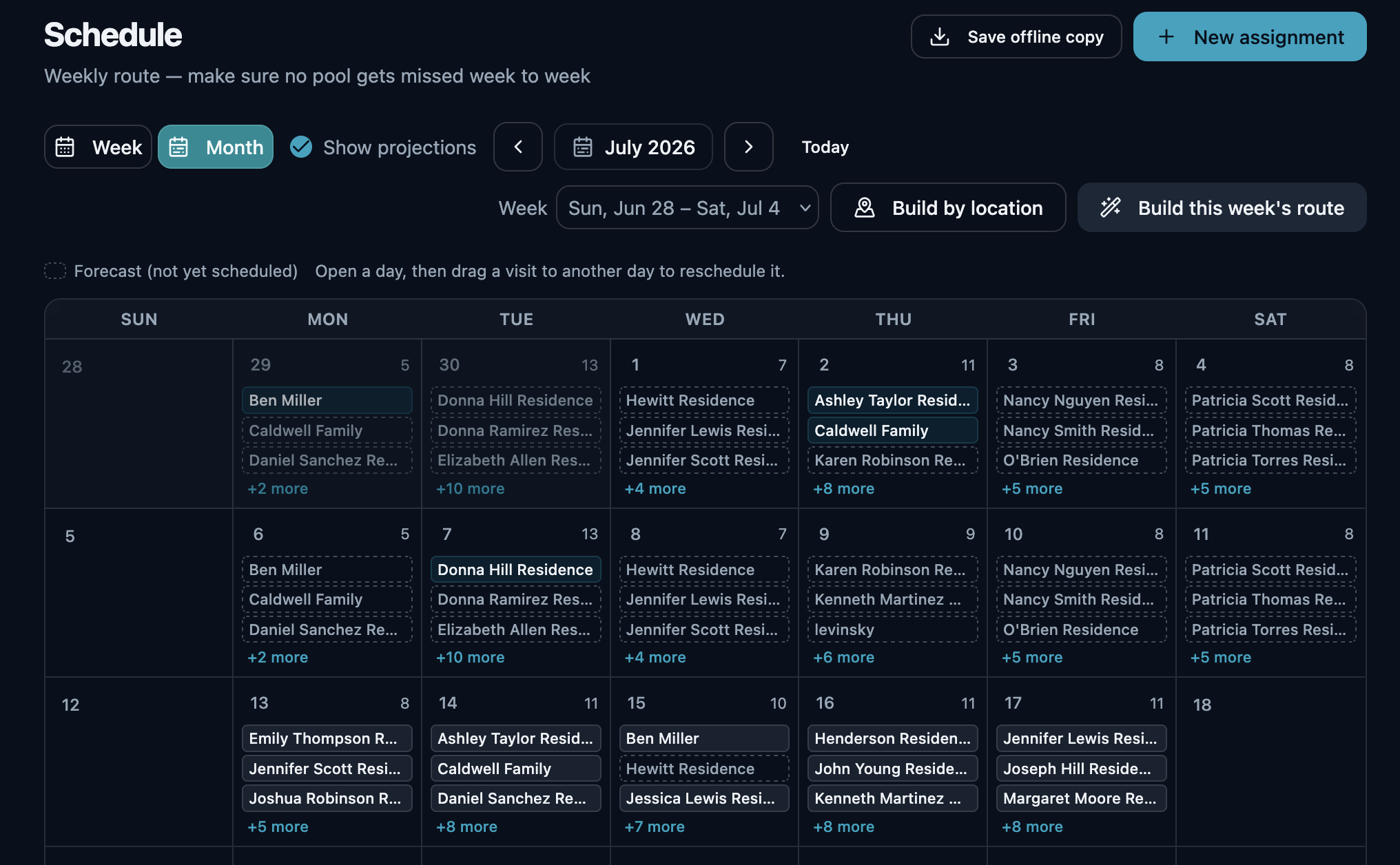
Set each property’s pump-out cadence — annual, every two or three years — and OrbitOps surfaces what’s due and routes the day, so tanks get serviced on time instead of slipping off the radar.
The dispatch board
On every plan, the calls go on a dispatch board: day, week and month for each tech. New call asks what kind of call it is and whose it is, then suggests a tech who does that kind of job and the next open time, with the drive from where they will be. A tech running behind shows on the board before the promise is missed, and an emergency can bump a stop — the moved customer lands in Unassigned, flagged to rebook. The Team tab holds time off, holidays and the on-call rotation, To do lists the recurring service that is due to be booked, and an install that runs past one day is booked with its days and its planned crew together.
Text-to-book
On Executive, with your own toll-free number verified with the carriers: a customer texts it, the message lands in the dispatch board’s tray, and a person on your side books the call from there. The customer gets one acknowledgement text so they know it arrived. Nothing else answers them — the booking is made by someone in your office.
The week on paper, before the signal drops
One press saves the week as a PDF: every scheduled stop, who it is assigned to, and the contact details for the customers on it. If a property sits out of signal, the day still runs off the copy you already saved.
Billed as each job closes
Bill each pump-out, inspection or repair as it closes. The job checklist becomes the invoice, so billing is approve, send, done — and a commercial account’s statement shows everything still open.
Get paid on completion
Send a pay link as the pump-out closes — the customer pays by card on Stripe’s hosted checkout and funds settle into your own Stripe account. Cash and checks get recorded against the same invoice.
Tank & system history per property
Every pump-out, inspection and repair stays on the property’s system record — tank size, condition, findings — so the next visit and the next inspection start informed.
The day arrives on the phone, already in order
The office builds the week. The tech opens one screen and works down it — and everything recorded on the way is what the invoice gets built from. The tech’s half runs in the OrbitOps Field app (App Store · Google Play); the office’s half runs in the browser.
Open it and work down the list
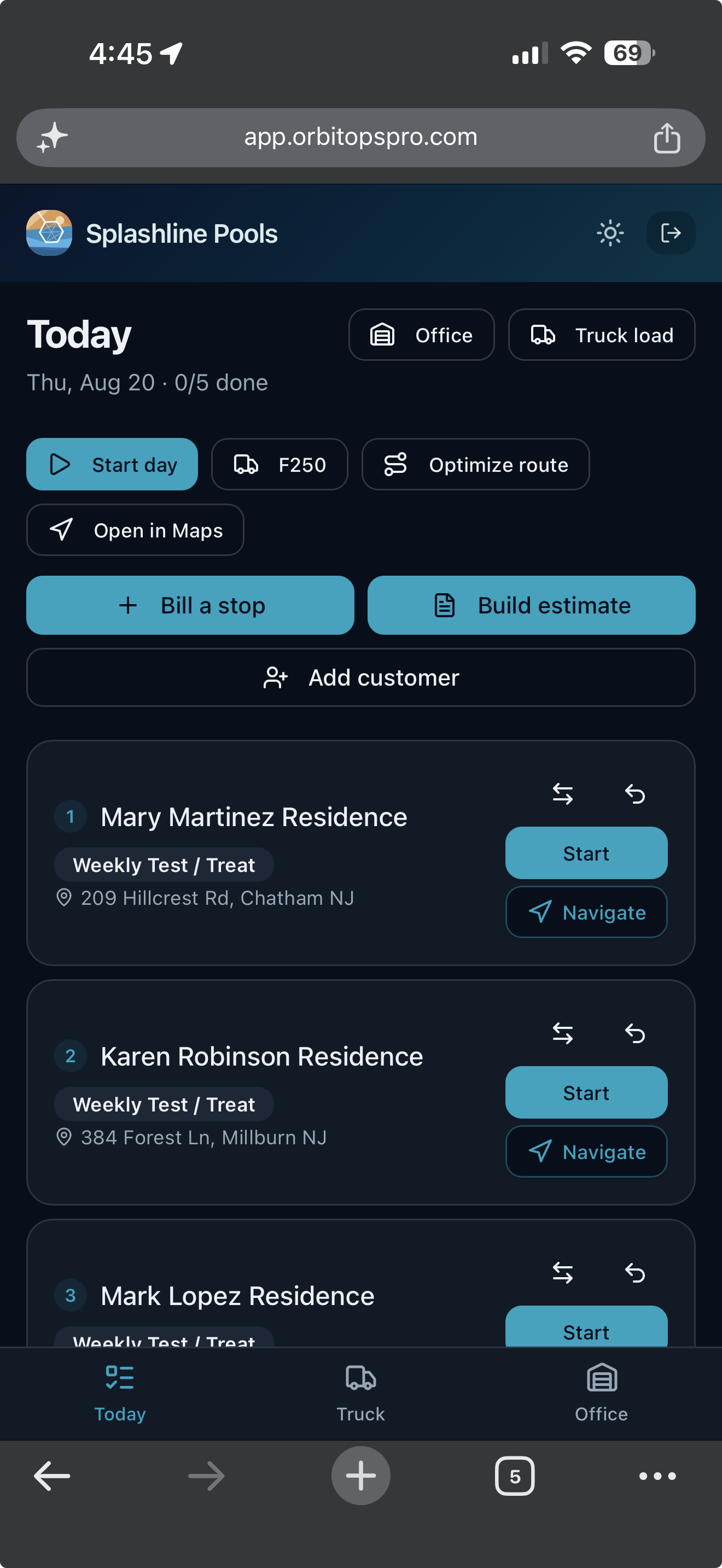
Today opens on the stops in order, each with the customer, the visit type and the address, and a count of how many are done. One tap starts a stop, one opens it in Maps. Nobody is calling the office to ask what is next.
What they record is what you bill
Materials, readings and notes are captured at the stop while the tech is standing in it. The visit record is the billing record, so the invoice is built from what happened rather than reconstructed on Friday.
Billing and quoting from the driveway
A tech you trust can bill a stop as they finish it, and build an estimate while they are standing in front of the work. What they bill in the field lands as already billed, so the office cannot bill the same visit a second time. The billing grant is per tech and yours to give. Quoting from the field is on every plan — the foreman standing in front of the work is the one who knows what it is. Writing the ordered scope onto that quote, photographing what is being quoted, and starting from a quote you have already written come in on Executive.
The materials you don’t bill are profit down the tank.
Risers, lids, filters, baffles, additives — septic jobs use materials beyond the pump. Log them on the visit and they land on the invoice. Reconstruct them later and the ones you forget are margin, gone.
Techs log what they use, on the visit
Risers, filters, baffles and additives get recorded on the tech's checklist while they're on site — not reconstructed from memory at the end of the week.
Used becomes billed, automatically
Whatever went onto the job flows straight onto the invoice as a line item. The checklist is the billing record. One action, both records: the visit log and the invoice line.
See what’s stocked on each truck, and what it's worth
On Executive and Premier, every logged item draws down truck and shelf stock in real time, with cost attached — so you know what you're holding, what it's worth, and when to reorder.
The delivery back in, in one press
The last arrow is the one most systems leave to you. When the order turns up, book it in against the purchase order that raised it: the stock lands on the shelf and the order marks off what arrived, in the same press. Nothing is counted twice — press it again on a bad signal and the second press moves nothing.
- Half now, the rest next week. A short delivery is recorded for what actually came, and the remainder stays open on the order. The next van is a second delivery against the same PO, not a correction to the first.
- You cannot receive more than you ordered. A line that would take the delivered count past what the order asked for is refused, not quietly absorbed.
- A wrong delivery is corrected, never rewritten. Undo one and it takes back exactly what that delivery put on the shelf — read from the record the delivery itself wrote, not recalculated from what the order says today. Nothing is deleted: the reversal is appended beside the delivery, so a delivery that arrived and was taken back stays two facts rather than becoming silence. Miscounted it? The original is kept and reversed, and a new one records what really arrived, linked back to the one it replaces — the same way an invoice is voided and reissued instead of edited.
- All of it, or none of it. If the fourth line on a delivery names a product you have since removed, the first three do not land either. There is no half-received order to unpick.
Scheduling tools that ignore materials bill the pump-out and eat the rest. OrbitOps captures both — because what comes off the truck goes on the bill.
See what each plan includesSeptic Service software questions, answered
Can it schedule recurring pump-outs on long cadences?
Yes. Set each property’s cadence — every one, two or three years — and OrbitOps tracks what’s due and routes the day, so tanks that only come up occasionally never fall off the schedule.
Does it document inspections?
Yes. Inspection is a built-in visit type with a checklist to record findings against the property, so every inspection stays on the property record instead of a paper folder.
Will it track the system per property?
Yes. Each property carries its full visit history — past pump-outs, inspections and repairs — so every visit begins with the record of what has already been done there.
Your customers didn't sign up for our software — you did. Their names, addresses and phone numbers stay in your account. Your books get a month of totals rather than your client list, and our own support console can't display who they are.
What leaves your account →Run your septic service business, not your software.
Create your account and get set up in your trade. Scheduling, invoicing and card payments are included in every plan.
Questions first? Talk to us.
Email support@orbitopspro.com to chat with us.